Transferring Assets
You can conveniently transfer funds from your wallet from two places:
Central Dashboard — Click the Withdraw button near the top of the dashboard
Portfolio Page — Select a wallet, then click the Withdraw button on the dedicated Wallet page
If you selected Withdraw from the dashboard, complete the required information on the screen.
Select the Asset you would like to send
Select the Wallet you would like to Withdraw from
Choose the Wallet you would like to Withdraw to
Enter the amount you would like to send
Click Review
Review the transaction details and click Send Funds
Enter your 2FA code
Enter your wallet password
You can monitor the status of a transaction in three ways:
Click the Alert Bell (?) in the top-right corner and navigate to Transactions.
Go to Security > Activity Log > Transactions.
Navigate directly to the relevant wallet and select Transactions.
You can monitor the status of this transaction:
Clicking into the Alert Bell on the top right corner and then looking at Transactions
Going to by Security > Activity Log> Transactions
Or going directly into the selected wallet and looking at Transactions. clicking on the wallet in the Wallets page or the Tasks > Transactions tab and looking at your transaction history for that wallet.
Using Optional Parameters for Transactions
When you are sending a transaction, there are additional parameters you may add to the transaction under Advanced Options.
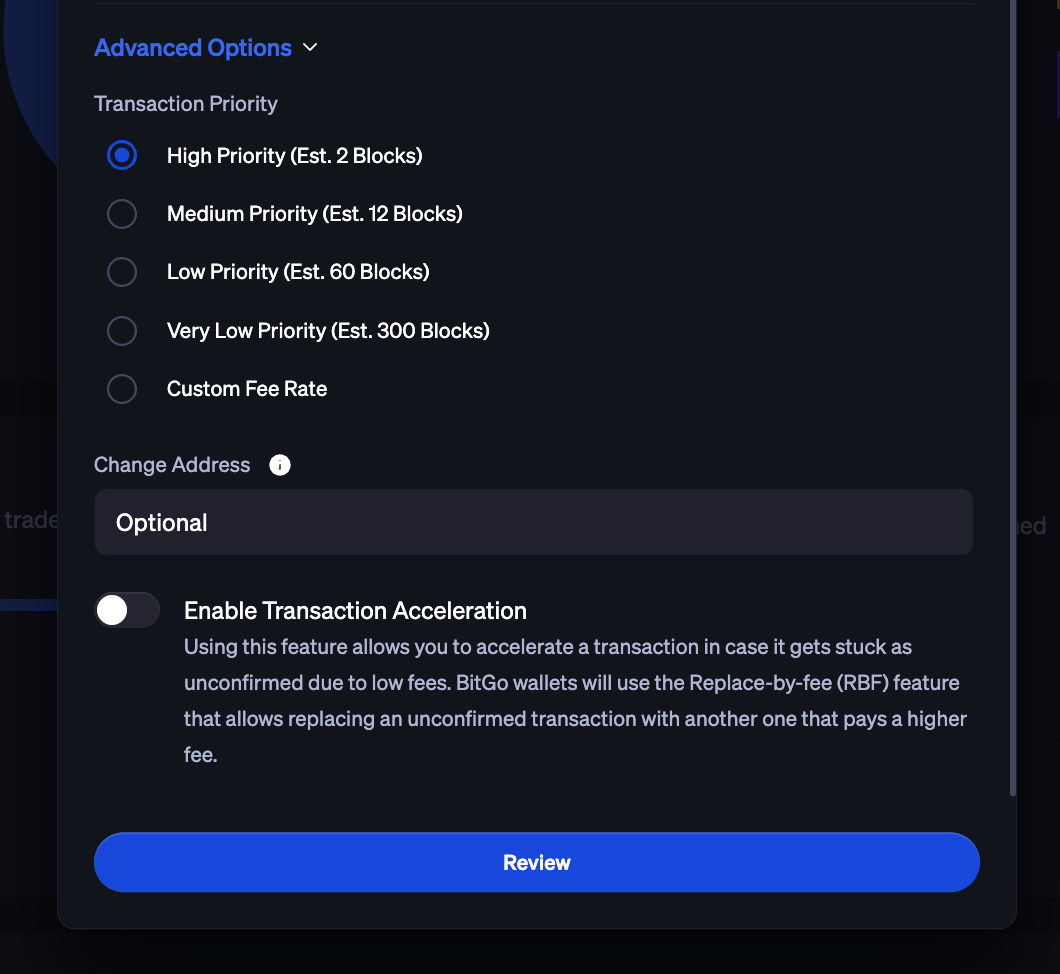
Transaction priority
This parameter allows you to ensure a faster or slower transaction confirmation. Selecting a higher priority will result in higher transaction fees, whereas a lower priority will result in lower fees. You may also input a custom fee rate in satoshis per byte if desired.
Sequence ID
A sequence ID is a unique identifier that you may specify which is applied to a transaction during its creation.
With a sequence ID you can easily reference transactions, for example, to safely retry sending. Because the system only confirms one send request per sequence ID (and fails all follow-on attempts), you can retry sending without the risk of double spending. The sequence ID is only visible to users on the wallet and is not shared publicly.
Was this article helpful?
That’s Great!
Thank you for your feedback
Sorry! We couldn't be helpful
Thank you for your feedback
Feedback sent
We appreciate your effort and will try to fix the article